RadioBOSS combines playlist automation, live input, audio processing and internet stream encoding in one Windows application. That makes it practical for stations that want a staffed studio during the day and scheduled programming at other times. This tutorial explains a reliable connection to an RCAST SHOUTcast or Icecast service, then goes beyond the connection screen to cover audio routing, metadata, monitoring and failure prevention.
What you need before configuration
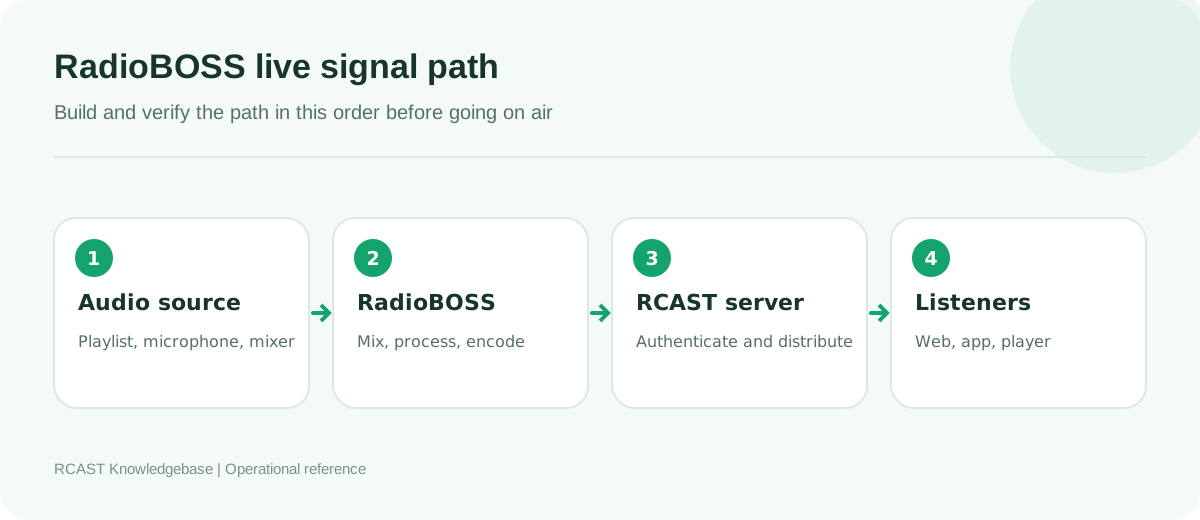
Install a current supported RadioBOSS release from DJSoft and restart Windows after installing or changing an audio interface driver. Keep the RCAST service page open so you can copy the server hostname, source port, source password and, when applicable, mount point or SHOUTcast stream ID. Do not substitute the listener URL for the source hostname. A listener URL receives audio while an encoder connection sends audio.
Decide what RadioBOSS will transmit. A simple automation computer can use the RadioBOSS playback mixer as its source. A studio with a physical console normally sends the console output into a line input on a dedicated audio interface. Avoid selecting the laptop microphone by accident. Windows may label several devices with similar names, so play a test tone or speak into the intended channel and confirm that only the correct RadioBOSS meter responds.
Add the streaming connection
- Open Settings, choose Options, then select Broadcast.
- Enable broadcasting and press the plus button to add an encoder.
- Choose the server family shown by RCAST. Use SHOUTcast v2 only when the service is configured as SHOUTcast v2. Choose Icecast for an Icecast mount.
- Enter the hostname without
http://or a path. Enter the source port as a number. - Enter the source password. For an Icecast account that supplies a source username, enter that username exactly. Otherwise use the default expected by the service.
- For Icecast, enter the mount point with its leading slash, such as
/stream. For SHOUTcast v2, enter the stream ID in its dedicated field if RadioBOSS requests it.
Use the configuration wizard if the installed version provides one, but review every resulting field before saving. Wizards cannot know whether a provider uses a special source port, username or mount. A successful setup should produce a clear connected message in the RadioBOSS log. Repeated reconnect messages indicate a configuration or network problem, not a normal steady state.
Choose a format that matches the station plan
MP3 remains the safest general choice for broad player and device compatibility. AAC can provide better perceived quality at lower bitrates, but compatibility must be tested against the station's target apps, directories and hardware players. Start with one primary stream rather than creating many qualities before there is a real audience requirement.
| Use case | Practical starting point | Notes |
|---|---|---|
| Speech and talk | MP3, 64 to 96 kbps, mono or stereo | Mono can preserve speech quality at a modest bitrate. |
| General music | MP3, 128 kbps, stereo | A dependable compatibility baseline. |
| Music with limited bandwidth | AAC, 64 to 96 kbps, stereo | Test every important listening platform first. |
| High quality music | MP3 192 kbps or AAC 128 kbps | Requires more listener transfer and source upload. |
Use 44.1 kHz for a music library built around standard music files unless the production chain has a deliberate 48 kHz workflow. Unnecessary sample rate conversion can add complexity without improving sound. Keep the encoder channel mode consistent with the programme. Sending stereo silence around a mono microphone does not add useful information.
Route and process audio correctly
When RadioBOSS itself plays the music, select its programme output rather than an unrelated Windows input. When a mixer supplies the programme, choose the interface channels connected to the mixer's main or broadcast output. Set the interface for line level when receiving a line output. A microphone input has much more gain and can distort immediately.
Build gain in stages. Music files should not slam into a limiter on every beat. The microphone preamp should provide a healthy signal without clipping. The final processor may control peaks and create consistent loudness, but it should not repair gross overload earlier in the chain. Leave headroom for presenters who become louder on air. Monitor both the local programme and the returned internet stream because they reveal different faults.
Configure useful metadata
RadioBOSS can send the current artist and title from the playing item. Good metadata depends on a clean library: put the artist in the artist field and the song name in the title field instead of embedding both inconsistently in filenames. Create intentional metadata for station IDs, news, syndicated programmes and live microphone segments. Blank or malformed text makes players appear broken even when the audio is healthy.
Do not publish internal paths, automation notes or advertising traffic codes. Review the exact public text in a real player. If non-English characters appear incorrectly, leave metadata character handling on its automatic setting first, then change it only when the complete path has been tested.
Perform a proper on-air test
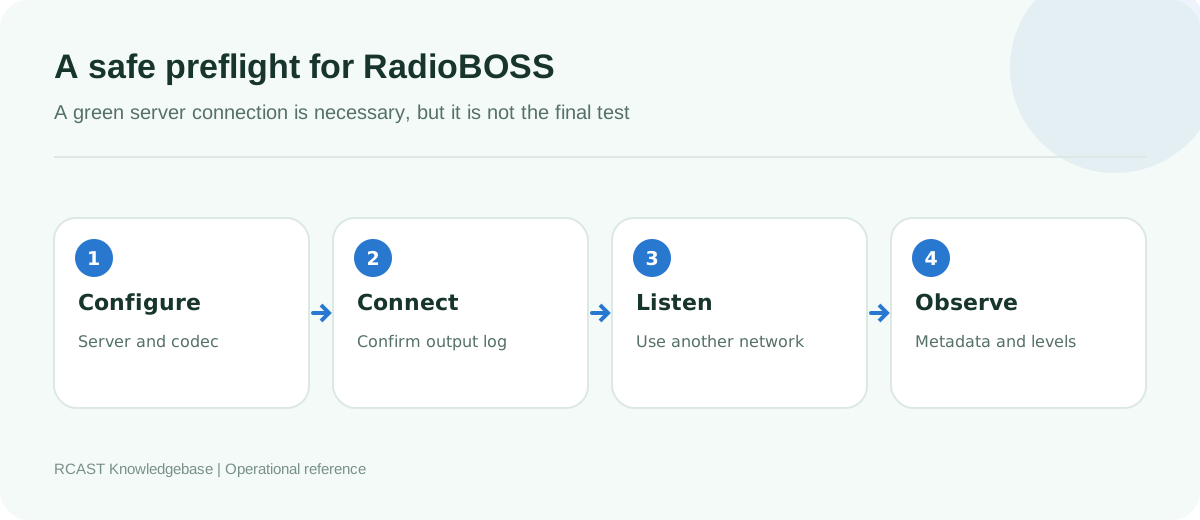
- Start a clearly identifiable test playlist at a moderate level.
- Connect the encoder and confirm that RadioBOSS reports a stable connection.
- Open the public player on a phone using mobile data. This avoids a local network result that can hide firewall or routing problems.
- Listen for at least ten minutes. Check left and right channels, speech, transitions and loud passages.
- Confirm that artist and title changes arrive at the player.
- Stop the source intentionally and verify the expected AutoDJ or fallback behaviour.
- Reconnect and confirm that live audio returns without requiring listeners to reload the page.
Common connection failures
Password rejected
Retype the source password and check for copied spaces. Confirm that the service has not supplied separate admin and source passwords. On Icecast, verify the source username. On SHOUTcast v2, verify the stream ID. Do not repeatedly change unrelated codec options because authentication occurs before audio quality becomes relevant.
Connection refused or timed out
Check hostname and source port, then test whether security software or the studio router blocks the outbound connection. Confirm that the RCAST service is active. A timeout usually points to routing, firewall or an unreachable host. An immediate refusal often means the address responds but nothing accepts the connection on that port.
Connected but silent
The server can accept a perfectly valid stream of silence. Watch the encoder input meter, not only the connection indicator. Verify the selected device, unmute the relevant mixer bus, and confirm Windows privacy settings permit access to the audio input. If meters move locally, listen to a recording from the same input to isolate encoder configuration from hardware routing.
Audio skips or reconnects
Use wired Ethernet for permanent automation. Disable sleep on the network adapter and computer. Compare the configured bitrate with the reliable upstream capacity, not the headline speed of the internet package. Check the RadioBOSS log timestamps. Regular gaps can indicate power saving or scheduled network activity, while random gaps often point to congestion or unstable Wi-Fi.
Operating RadioBOSS continuously
Create a dedicated Windows account for broadcast automation and prevent automatic sleep. Schedule operating system restarts rather than allowing an unexpected update during a live programme. Keep a tested backup of the RadioBOSS configuration, playlist database, scheduler and custom processing presets. A backup is useful only when another operator knows how to restore it.
After any driver, RadioBOSS or Windows update, repeat the external listening test. Device names and default inputs can change after updates. Document the working interface, sample rate, server type, destination and fallback procedure without writing the source password into the document.
Frequently asked questions
Can RadioBOSS send to more than one server?
Supported editions can configure multiple outputs. Each output consumes upload bandwidth and processor time, so commission one at a time and monitor the computer under realistic load.
Should RadioBOSS and AutoDJ play simultaneously?
They should not compete for the same source slot. Use the service's supported live takeover method so AutoDJ yields to the live source and resumes after disconnect.
Why does the stream have delay?
Encoding, server buffering, network transfer and player buffering all add latency. Several seconds is normal for public internet radio. Reduce buffers only after confirming that stability remains acceptable.
Once the connection, audio path, metadata and fallback have all passed an external test, RadioBOSS is ready for normal operation. Save screenshots with passwords hidden and keep a short studio preflight beside the computer so every presenter starts from the same known configuration.