Cloud media library
Search uploaded tracks and drag one into a precise timeline position.
Live control panel demo
Run every part of your online radio station from one purpose-built platform.
Open the shared demo instantly to explore live stream control, audience analytics, AutoDJ scheduling, the AutoDJ Studio Console, browser Voice-over and presenter tools. See what makes RCAST a smarter, more complete broadcasting solution.
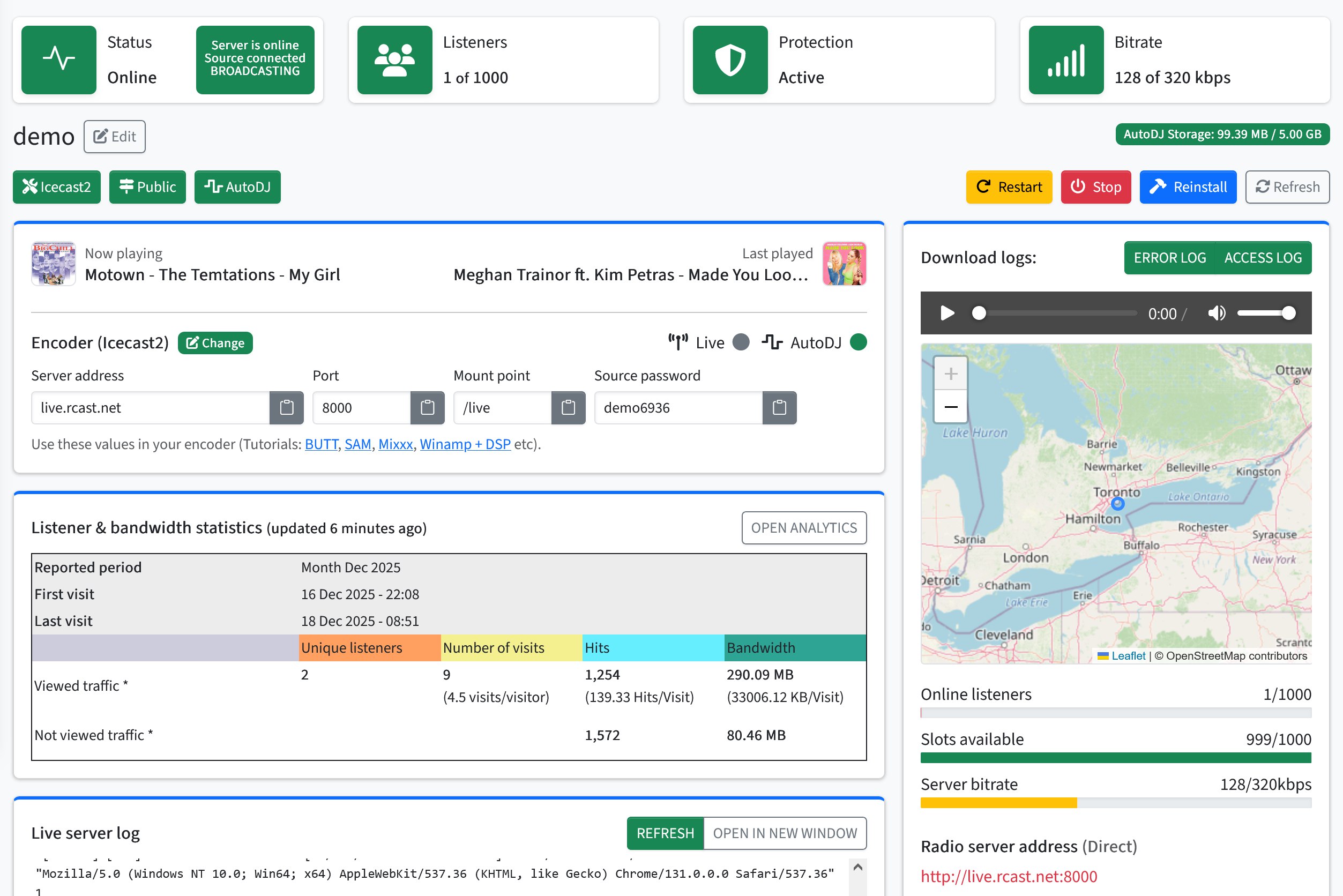
One broadcaster workspace
The dashboard brings station status, encoder details, audience activity and essential controls together without making you jump between disconnected tools.
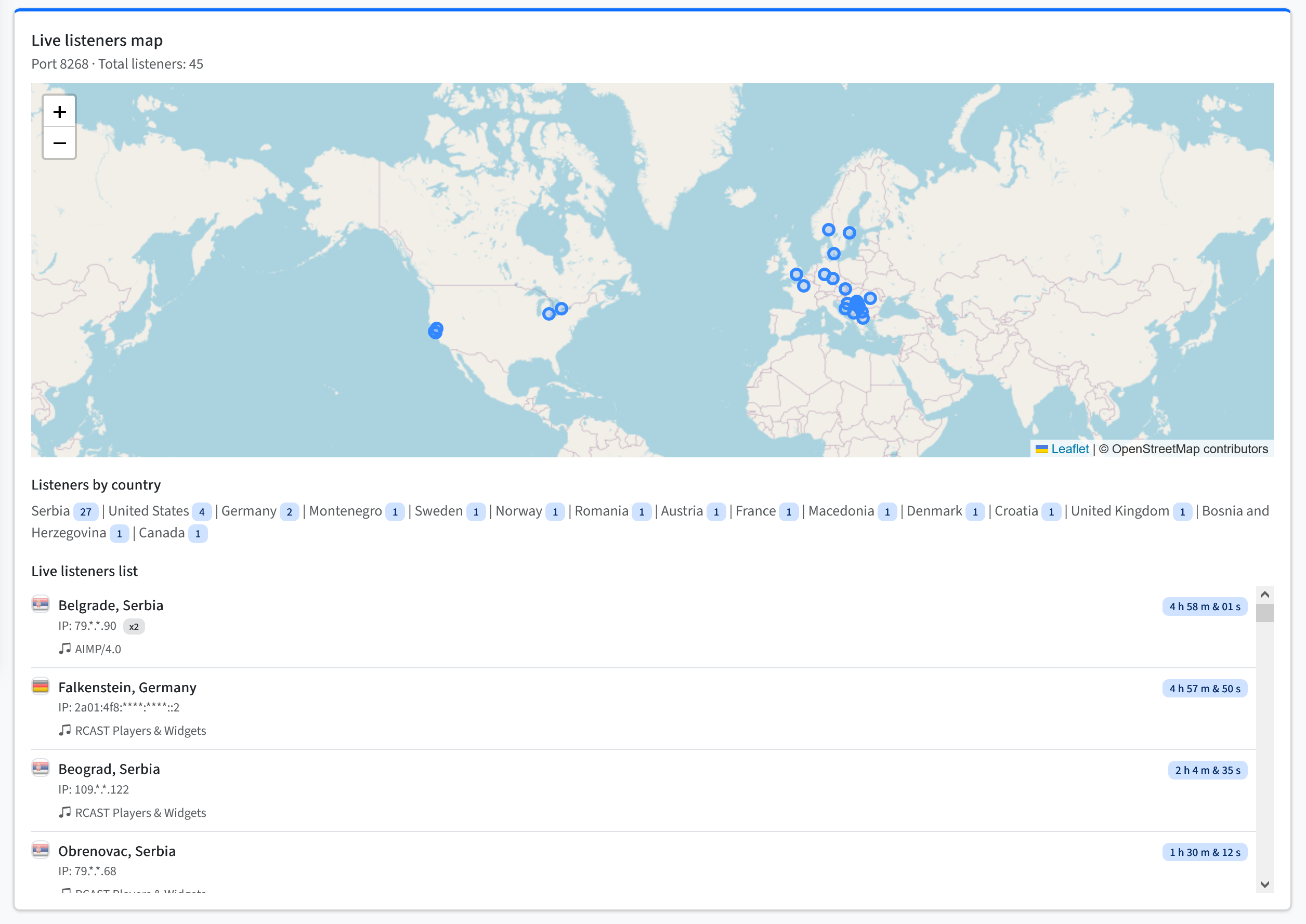
Audience intelligence
Follow active connections, countries, listening clients, session activity and bandwidth from the same panel used to manage your station.
AutoDJ Studio Console
AutoDJ Studio is where you control what happens next on air. Search the cloud media library, build the live timeline, handle listener requests, follow playback history and take the microphone for a live Voice-over while the station continues broadcasting.

Search uploaded tracks and drag one into a precise timeline position.
Reorder editable items and see estimated local air times.
Follow artwork, metadata, playback progress and the active audio source.
Use Play Next, add a request normally or mark it handled.
Watch the next item become Prepared and locked for reliable playback.
Review recently played tracks, finish times and their playback source.
Search the cloud libraryFind tracks by title, artist or filename and work with the station media already stored on RCAST.
Build the live timelineUse Play Next or drag tracks into exact positions, then reorder or remove items while they remain editable.
Take the microphone liveTest your input, use push-to-talk or continuous mode, apply music ducking and process your voice in the browser.
Follow every transitionWatch Now Playing, progress, sources and estimated local air times. Prepared tracks lock to protect playback.
Handle listener requestsMove accepted requests into the live queue, choose their position and mark them handled from the same workspace.
Create individual DJ accountsGive each presenter a separate login and choose permissions for AutoDJ, queue, requests, Voice-over and uploads.
Provide private DJ librariesAssign personal cloud storage, individual quotas and access to shared station media only when permitted.
Connect professional encodersGive authorized DJs dedicated encoder credentials without sharing the main station account. AutoDJ remains ready between live shows.
Browser Voice-over
Explore the presenter tools built directly into AutoDJ Studio. Select and test a microphone, go live over the running AutoDJ feed and keep the music, queue and automation working throughout the session.

Presenter and DJ management
RCAST provides individual DJ identities, dedicated connection details and precise permissions. Station owners keep control of the service while each presenter gets a workspace suited to their role.
Create separate logins for presenters and review account status and recent access without sharing the main station credentials.
Allow AutoDJ control, queue management, listener requests, Voice-over, private uploads or external encoding independently.
Assign personal cloud storage and individual quotas to selected DJs while retaining access to shared station media when permitted.
Give authorized DJs dedicated encoder credentials for professional live shows while keeping other station settings protected.
Control panel capabilities
Configure the stream, build automated programming, control upcoming playback and review audience data from the same RCAST account.
Check server status, the current track, listener activity and essential station information as soon as you sign in.
Use browser Voice-over for quick live segments, or connect professional encoder software for a complete live show.
Upload and organize media, create playlists, schedule programming and keep the station running around the clock.
Search the cloud library, use Play Next, edit the active queue, manage requests and control the microphone without interrupting the stream.
Study listeners, sessions, countries, devices, tracks and bandwidth through live data and historical reports.
Generate HTTPS-compatible players and station widgets that can be embedded into your own website.
Inspect listener and server activity, review recent events and find useful information when troubleshooting.
Create separate presenter accounts with permissions for AutoDJ, requests, Voice-over, uploads and external encoding.
Build a weekly program, place tracks and playlists at exact times and manage the station timezone from a visual schedule.
Organize the station library, assign private DJ storage and control which presenters can upload or access media.
Move between automated programming, browser Voice-over and external live sources while keeping the public stream available.
Use the browser-based panel from a phone, tablet or desktop without installing separate management software.
RCAST connects streaming controls, cloud automation, the live AutoDJ queue, listener requests and analytics in one control panel.
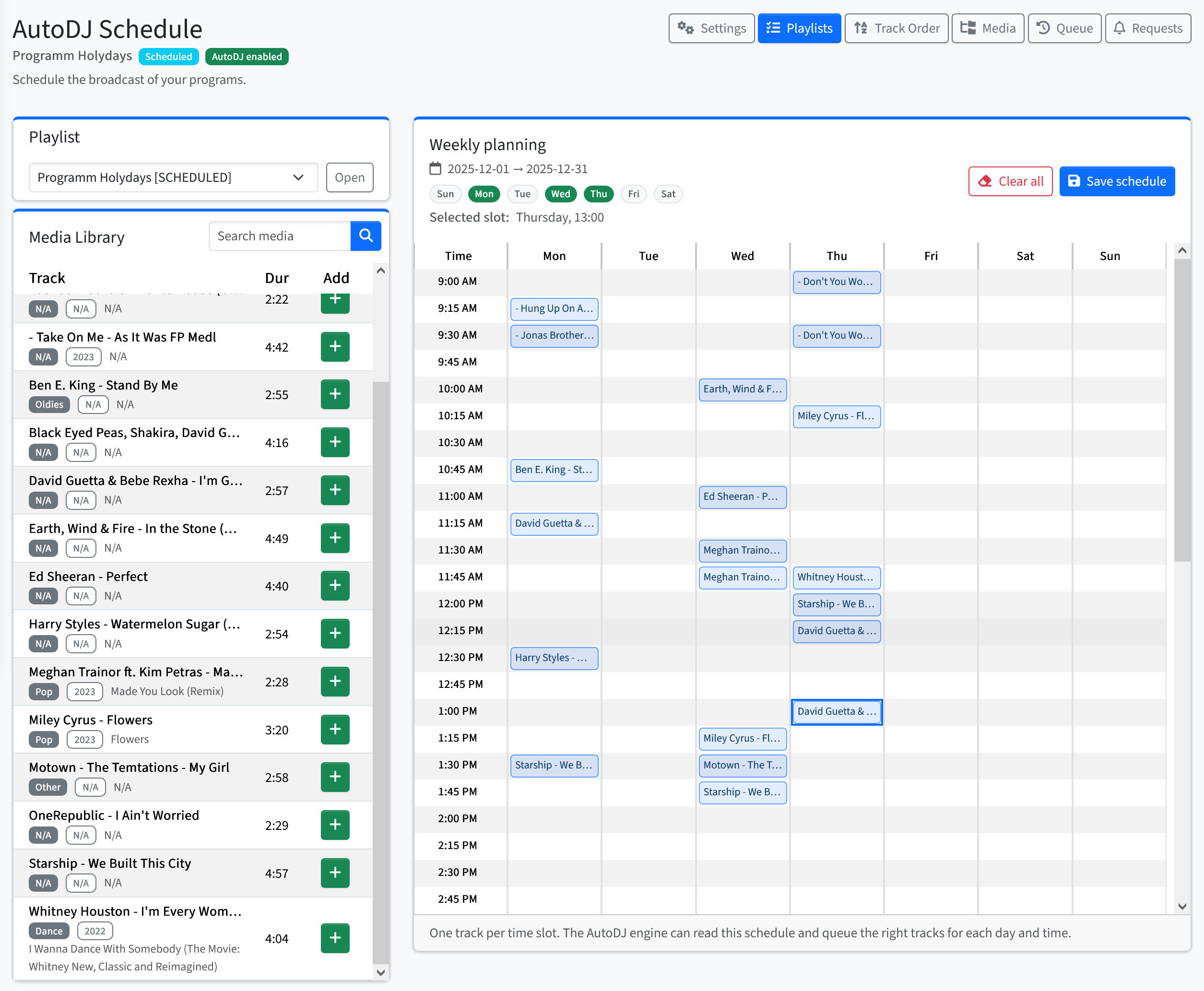
Visual broadcast scheduling
Build weekly programming from your cloud library, place tracks and shows at exact times and let AutoDJ maintain the rotation between scheduled content.
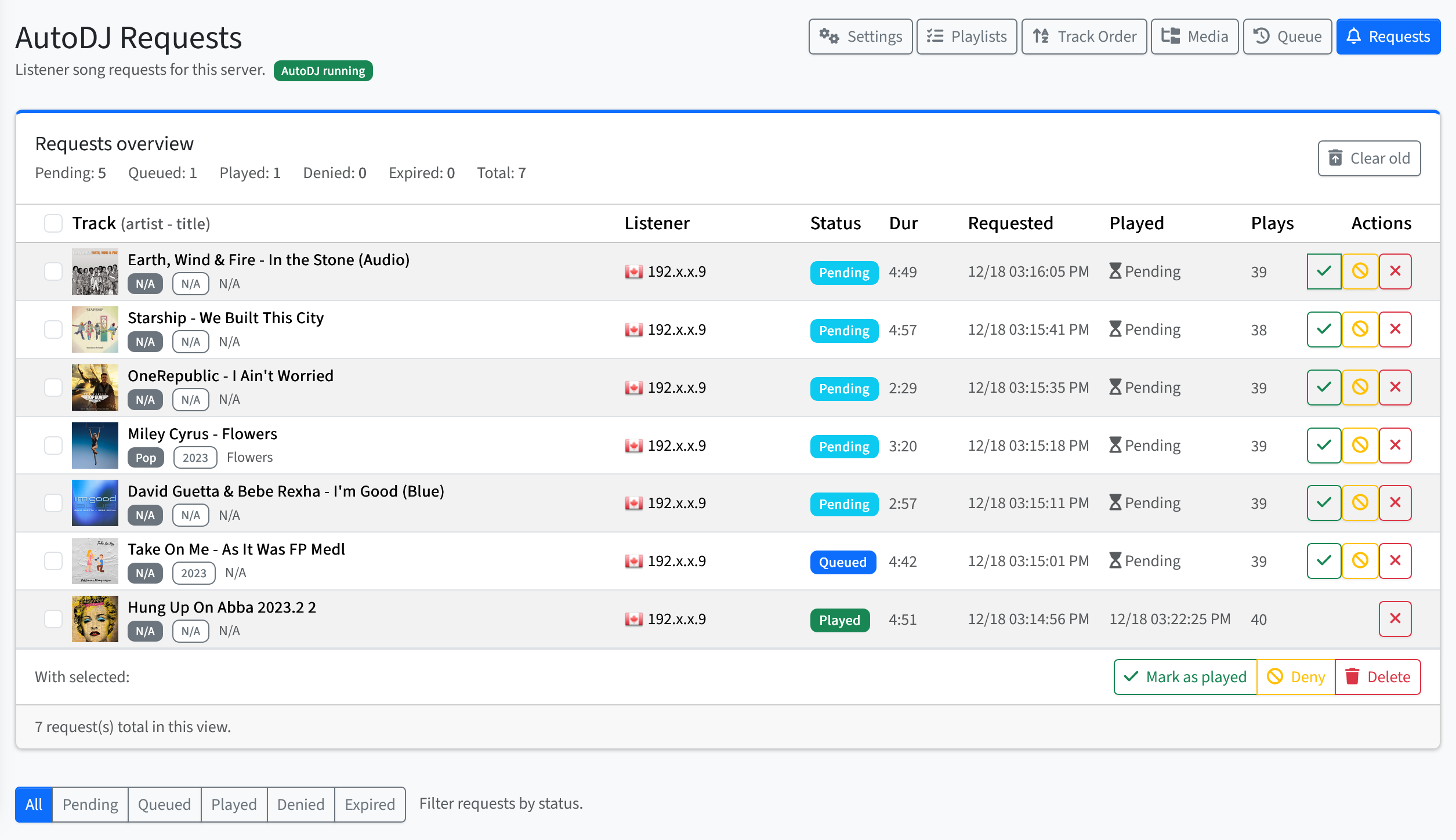
Listener engagement
Give listeners a direct way to interact with your station, then review and manage every request from the same control panel used to run your programming.
Before you open the panel
Everything you need to know before exploring the shared account.
No. Use the shared credentials shown at the top of this page and the control panel opens in a new browser tab.
Yes. This is not a static mockup or a staged product tour. The demo runs in a live RCAST production environment, allowing you to explore the same interface and broadcasting tools available to customers and experience the platform as it works in real-world use.
Yes. The demo presents the wider RCAST workflow, including station controls, encoder information, automation, AutoDJ Studio, listeners, logs and analytics. Some shared data may be reset periodically.
Yes. You can examine the visual broadcast scheduler, playlists and programming workflow, then see how listener requests are received and managed from the control panel.
No. The demo account is not limited, so you can explore the complete control panel experience. Because it is shared by visitors, its data and settings are reset periodically.
No. The shared account is provided for exploration. It does not give access to another customer's station or production service.
Yes. The browser-based interface can be accessed from a supported phone, tablet or desktop browser, so you can review station activity and available controls from different devices.
Yes. AutoDJ Studio is included with current RCAST Live and AutoDJ streaming plans at no additional cost. Visit the dedicated AutoDJ Studio page for its complete workflow and capabilities.
Your service is activated with access to your own RCAST control panel, where you can configure your stream and begin broadcasting. If you are moving an existing station, our team can also help make the transition easier.
Make RCAST your broadcast home
Start with the service that matches the way you broadcast today. The RCAST platform gives you the control and flexibility to develop your programming as your station grows.
Live hosting
Connect your preferred encoder, broadcast securely and follow station activity in real time, with AutoDJ fallback ready when the live source disconnects.
Explore Live hostingAutoDJ hosting
Turn your cloud media library into scheduled 24/7 programming, accept listener requests and take live control whenever the moment calls for it.
Explore AutoDJ hostingNeed help deciding?
We will help you choose the right hosting type, bitrate and audience capacity.