An internet radio station is a chain of separate systems. Audio is produced in a studio or automation platform, encoded into a continuous stream, delivered to a streaming server and then distributed to every listener. Understanding that chain makes software selection and troubleshooting much easier.
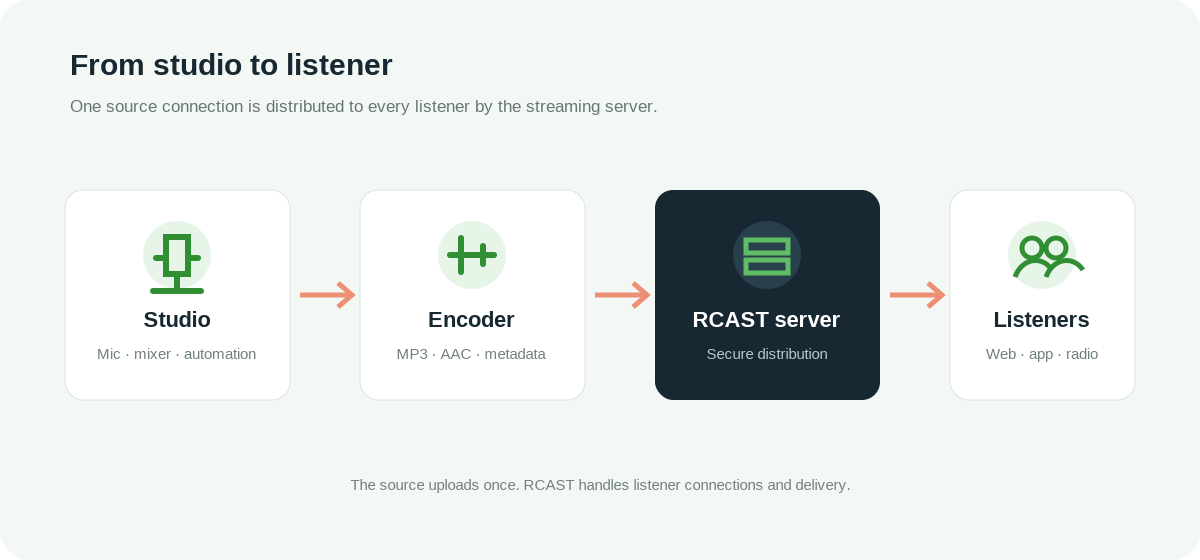
The four parts of an internet radio station
1. The programme source
The source is the finished audio your audience should hear. It may come from a presenter using a microphone and mixer, DJ software such as Mixxx, a radio-automation application, or a cloud AutoDJ service. Music files alone are not a broadcast; something must play, mix and schedule them.
2. The encoder
The encoder captures the programme output and converts it into a streaming format such as MP3 or AAC. It sends one continuous source connection to the streaming server. Live encoder applications include BUTT and Rocket Broadcaster, while RadioBOSS, SAM Broadcaster, StationPlaylist and Mixxx contain their own broadcasting functions.
3. The streaming server
SHOUTcast or Icecast accepts the source stream and duplicates it for listeners. If 500 people tune in, the studio does not normally upload 500 copies: it uploads one source, and the RCAST server handles listener distribution, connection limits and public delivery.
4. The player
Listeners reach the station through an HTML5 web player, mobile app, desktop player, hardware radio or directory. The player opens a public stream URL. This is different from the private encoder destination and must never contain the source password.
Signal flow
Metadata follows the same general path. The automation system or encoder sends artist and title information to the server; the player requests that information and displays it. Album artwork is usually obtained separately by matching metadata against a database or station library.
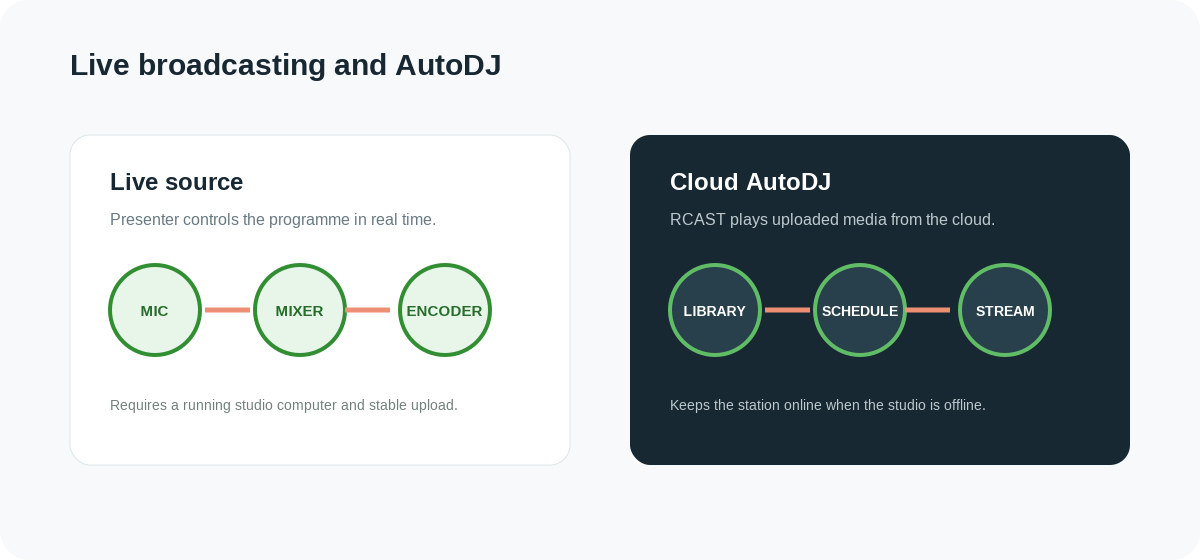
Live broadcasting and AutoDJ
A live station requires a computer, encoder and reliable upload connection while the presenter is on air. AutoDJ runs the programme from files stored on the hosting platform, so the station can continue when the studio computer is off. Many stations combine both approaches: AutoDJ provides the normal schedule and a live encoder temporarily takes control for shows.
Before going live, learn how the service handles source priority and fallback. Starting two encoders at once can cause authentication errors, rapid switching or silence depending on the server configuration.
Source bandwidth and listener bandwidth
A 128 kbps encoder needs a sustained upload comfortably above 128 kbps, but real networks need headroom. Other traffic, Wi-Fi interference and brief ISP congestion can interrupt a stream even when a speed test reports a higher average. Wired Ethernet and a conservative bitrate improve reliability.
Listener bandwidth is delivered by RCAST. A listener receiving a 128 kbps station uses roughly 57.6 MB per hour, before protocol overhead. Mobile audiences may prefer an additional lower-bitrate stream when available.
What the control panel does
The RCAST control panel shows whether a source is connected, current listener activity, service limits and listening links. Depending on the service, it may also manage AutoDJ media, playlists, schedules, HTTPS delivery and station tools. The control panel does not correct a muted mixer, wrong encoder input or overloaded studio connection; those remain part of the source chain.
A reliable launch checklist
- Activate the streaming service and identify whether it uses SHOUTcast or Icecast.
- Choose live encoding, AutoDJ, or a combined workflow.
- Configure the exact host, source port, password and mount/stream identifier.
- Select a codec and bitrate supported by the service and intended players.
- Set levels below clipping and test several types of programme audio.
- Connect the source and confirm the online state in the control panel.
- Listen from a separate network or mobile device through the public HTTPS URL.
- Verify metadata, reconnect behaviour and fallback before promoting the station.
Common architecture mistakes
- Entering the public listening URL into the encoder.
- Using an account password instead of the source password.
- Assuming a media player is also an encoder.
- Testing only through local studio monitoring instead of the public stream.
- Running a bitrate above the service allowance.
- Publishing source credentials in screenshots or configuration examples.
Once this source-to-listener chain is clear, every broadcasting application becomes easier to configure: different products use different labels, but they all need the same underlying connection information.
How delay is introduced
Internet radio is not an instant point-to-point call. The encoder collects a short block of audio, compresses it and sends it across the internet. The server and listener player add buffers to survive normal network variation. Codec choice, encoder buffer, server configuration and player buffer all contribute to end-to-end latency. A delay of several seconds is normal; increasing buffers improves resilience but also increases delay.
Metadata and artwork are separate layers
Artist and title metadata usually travels as small text updates alongside the stream. Correct tags must exist in the automation library, and the encoder must be configured to submit them. Artwork is rarely embedded continuously in an internet radio stream. A player or station service normally looks up an image using the artist/title pair, a track identifier or a station-managed library. For predictable results, normalize spelling and avoid adding promotional text to the artist field.
Designing for failure
A professional station assumes that computers, routers and internet connections can fail. Save an exported copy of encoder settings without publishing credentials, keep a second tested encoder profile and document how a presenter hands control back to AutoDJ. Where possible, connect the studio computer by Ethernet, use an uninterruptible power supply for the modem and mixer, and know how to verify the public stream from a mobile connection.
Live handover procedure
- Prepare the live encoder while AutoDJ remains on air.
- Confirm the correct input device, levels, metadata and source profile.
- Use the service's supported live takeover method; do not repeatedly force connections.
- Verify the public stream from a separate device.
- At the end, stop the live encoder cleanly and confirm that fallback programming resumes.
How to test like a listener
Studio meters prove only that audio exists before encoding. Always open the public HTTPS stream on another device, preferably over a different network. Listen long enough to hear speech, music transitions and metadata changes. Check that left and right channels are correct, speech is intelligible, music is not clipping, and silence detection or fallback behaves as expected.
Frequently asked questions
Does every listener connect to my studio computer?
No. Your encoder sends one source stream to RCAST; listeners connect to the RCAST delivery infrastructure.
Can I run a station without leaving a computer on?
Yes, when the programme is produced by cloud AutoDJ. A live show still requires an active source for its duration.
Why do I hear the station several seconds late?
Encoding and playback buffers protect the stream from network jitter. Some latency is an intentional reliability trade-off.
Can two presenters connect simultaneously?
Not unless the workflow explicitly mixes or prioritizes multiple sources. Normally one programme source controls a stream at a time.